
Let me be honest: some projects you do because they are necessary. This one we did because someone loves sneakers and we were to build a museum for them. In the browser. In 3D. With Unity. And I underestimated what that means.
The storyboard, September 2020
Before a single line of code existed, there was a storyboard. Five pages, drawn, with captions, like a film. I still have it, dated 22 September 2020.
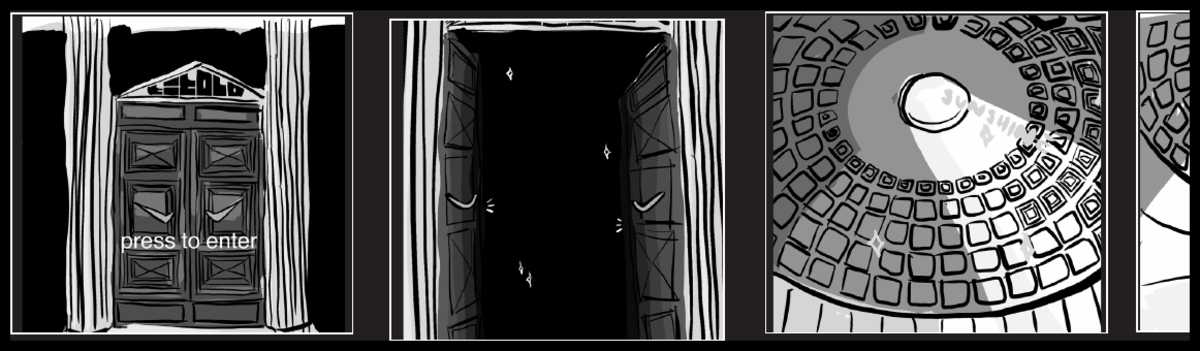
It went on like that, panel by panel. If the visitor takes a step, a basketball player runs past him from behind and shoots hoops, in an endless loop. Walls slide up, five dunks on each wall. Click a shoe and it detaches from the wall and slowly spins 360 degrees, the key facts next to it. And when you want to go on, the floor moves, bends, and a spiral staircase appears leading down. Before you take it, a skater shows up, rides down the banister, and you can follow him.
At the beginning of the storyboard there is a video: dawn, a temple on a hill, modern, clean pillars that do not quite fit the landscape. Engraved on the temple: "Dunk Museum". Titolo. That was the client, the sneaker store, and that was the idea: not a product page, but a place.
The idea
Titolo sells sneakers, and sneakers are objects you want to look at. From all sides, in detail. A photo shows one side. We wanted you to walk around the shoe, to have it stand on a pillar, to have the room tell something.
The museum was to run in the browser. No download, no app, no store. Click the link, push the door open, be inside. And whoever has a VR headset should be properly inside, via WebXR. Whoever does not clicks and drags with the mouse to look around. That is still what the page says today at devpoint.org/dunk.
Unity in the browser
We took Unity. Not because it was the easiest choice, but because it was the only one that gave us physics, animation, light and a 3D model with hundreds of thousands of vertices in one tool. Unity can export to WebGL. That sounded like a checkbox. It was a project of its own.
A Unity build for the browser is a package of WebAssembly, data and shaders that has to be loaded completely before anything happens. What runs in seconds in Unity on your machine has to go through the network, into the memory of a browser tab, and then run on a graphics card you do not know. A laptop, an old phone, a corporate machine with a locked driver. All at the same time.
Size, memory, physics, vertices
That was the real fight, and it had four fronts.
Size. A sneaker in good resolution, with textures for leather, fabric, sole, is big. Five of them, plus room, plus dome, plus player, plus skater. Every megabyte in the build is a second in which the visitor reads "Loading" and considers closing the tab.
Memory. A browser tab has a limit. Exceed it and the tab dies, without an error message, without a log. We shrank textures, merged models, loaded things only when you approached them. And still tabs died, on devices we did not have.
Physics. A ball that bounces. A floor that bends. A skater on a banister. Physics in Unity is easy. Physics in Unity that runs and looks the same on every device in the browser is not easy. Too many steps per second and everything stutters. Too few and the ball flies through the floor.
Resolution and vertex count. A shoe that slowly spins 360 degrees, where you are supposed to see the stitching, needs vertices. Many. Five shoes on a wall, twenty in the museum, and the graphics card in the browser gives up. So fewer vertices where you do not look. More where you do. And every time the question: can you see the difference? Usually yes.
The biggest effort was the budget
And now the part I least like to tell and that matters most.
Fact is: the biggest effort was not the technology. It was the budget. Not because it was too small, but because back then nobody knew what something like this costs. There was no comparison. A website, everyone knew that. An app, everyone knew that. A walkable museum in 3D in the browser, with physics and animation, running on every device: nobody had ordered that before, and nobody had sold it before.
So we explained. Why a shoe is not simply a photo. Why "runs in the browser" is more work than "runs on my machine". Why every wall, every skater, every staircase has to be not just drawn but built, optimised and tested. And why a device we do not have still has to work.
The explaining took almost as long as the building. And that was the real lesson: whoever makes something that does not exist yet must first explain why it costs so much. Otherwise you build it and pay for it yourself.
What you would do differently today
The storyboard first, still. The five pages from September 2020 were the best part of the project. Before code exists, everyone knows what happens when you open the door. I would do that exactly the same today, only with an effort estimate next to it, per panel.
Fix size and devices on day one. How big the build may be, on which worst device it must run. Those are two numbers, and they determine everything after. We did not have them at the start. We had them when the tabs died.
Models with a budget per vertex. Every shoe gets a number it may not exceed. Whoever delivers a model delivers it at that size. That is unromantic and saves weeks.
And explain the budget before you start. With a storyboard, a list of the fronts, size, memory, physics, vertices, and one sentence per front on why it is work. That would have saved half the conversations back then.
And still: when I watch the video, the dome, the light, the shoe spinning, it was worth it. It ran. In the browser. Without a download. And it was fun, which for a project at a bank or a telco is rarely the point.
A museum in the browser is not a checkbox in Unity. It is size against quality, memory against detail, physics against devices you do not have. And before that a budget you have to explain because nobody knows it. That is what we learned. And the shoe is still spinning.
Written by me. The thoughts, the values, the learnings, the mistakes: all mine. Grammar and spelling are corrected by our own twin model, trained on my texts. Sometimes a stumble stays in. That is mine too.